
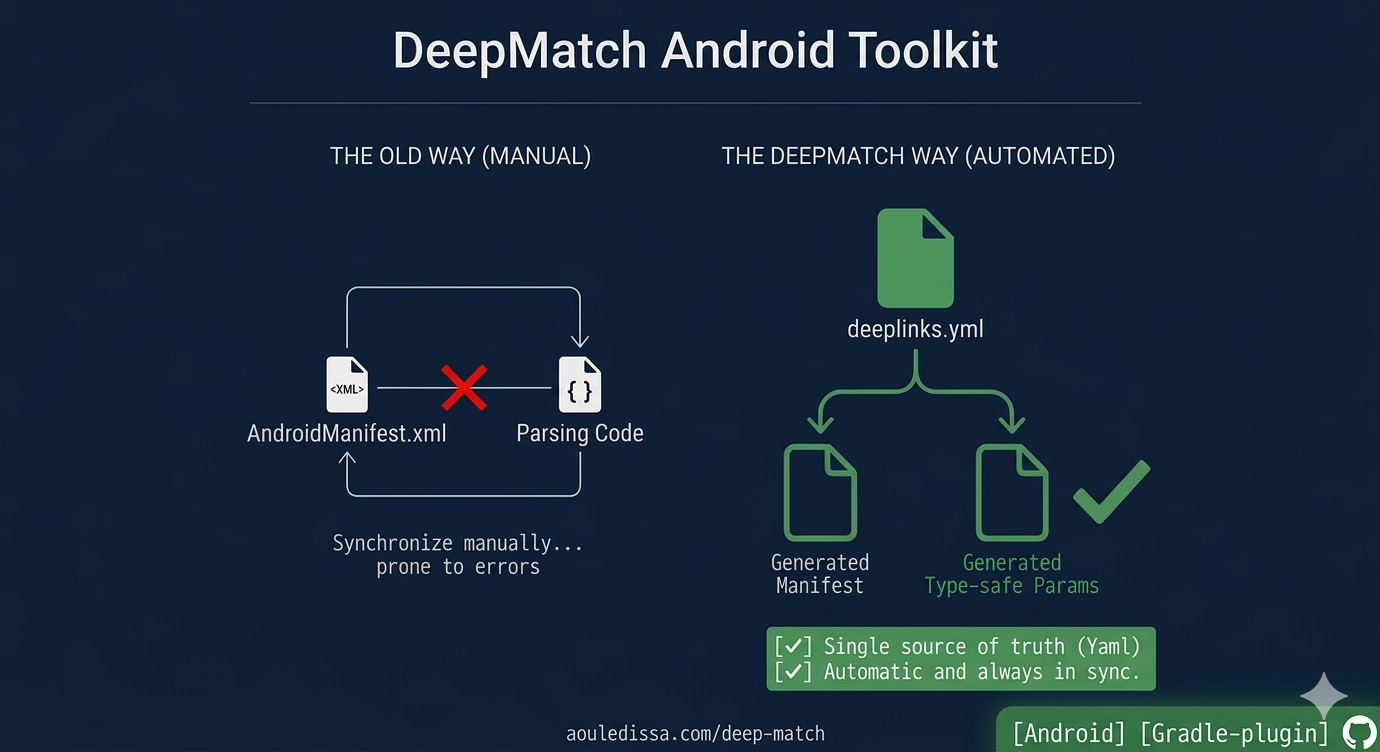
Deep linking in Android is broken by design. You declare intent filters in AndroidManifest.xml, then duplicate that knowledge as URI-parsing logic in Kotlin. These two pieces of the same feature live in different files, have no knowledge of each other, and drift apart silently — causing runtime crashes, silent failures, and bugs that only surface in production.
This is the deeplink synchronization problem, and it affects every Android app that handles more than a handful of deeplinks.
I built DeepMatch, an open-source Gradle plugin that eliminates this problem entirely. You declare your deeplinks once in YAML, and the plugin generates everything else — manifest entries, type-safe Kotlin parameter classes, and runtime routing logic — all guaranteed to stay in sync.
Here’s what I learned building it, why this approach works, and how to add it to your project in 5 minutes.
The Android Deeplink Synchronization Problem
Let me start with a concrete scenario. You’re building a social app, and you want to support deeplinks like https://myapp.com/users/123 to open a user’s profile.
You start by declaring an intent filter in AndroidManifest.xml:
1
2
3
4
5
6
7
8
9
<intent-filter>
    <action android:name="android.intent.action.VIEW" />
    <category android:name="android.intent.category.DEFAULT" />
    <category android:name="android.intent.category.BROWSABLE" />
    <data
        android:scheme="https"
        android:host="myapp.com"
        android:pathPrefix="/users/" />
</intent-filter>
Then you write code in your Activity to extract and validate the data:
1
2
3
4
5
6
7
8
9
10
11
12
class ProfileActivity : AppCompatActivity() {
    override fun onCreate(savedInstanceState: Bundle?) {
        super.onCreate(savedInstanceState)

        val userId = intent.data?.pathSegments?.get(1)?.toIntOrNull()
        if (userId == null) {
            showError()
            return
        }
        openProfile(userId)
    }
}
Now imagine you need to add a query parameter—say, a ref that tells you where the user came from. You update the manifest… but forget to update the code to extract ref. Or you update the code but don’t realize the manifest needs to be changed.
What happens next?
- Sometimes the link works but the feature that depends on
refsilently doesn’t. - Sometimes the app crashes because you’re calling
toInt()on something that isn’t a number. - Sometimes the manifest declares a path that your code doesn’t actually handle.
None of these failures happen at compile time. They all happen at runtime, in production, when a user clicks a link.
This is the synchronization problem: two pieces of the same feature, living in different places, with no mechanism to keep them in sync.
DeepMatch: Declare Once, Generate Everything
The insight that led to DeepMatch was this: what if the deeplink specification was the only thing the developer had to write?
Instead of writing manifest XML and Kotlin code, what if you wrote a declarative spec that described what the deeplink looked like and what parameters it needed? Then a tool could generate:
- The manifest intent filter entries
- Type-safe Kotlin parameter classes
- A runtime processor that validates and extracts parameters
All three would be generated from the same spec, so they’d always be in sync by definition.
Here’s what it looks like:
1
2
3
4
5
6
7
8
9
10
11
12
13
deeplinkSpecs:
  - name: "open profile"
    activity: com.example.app.ProfileActivity
    categories: [DEFAULT, BROWSABLE]
    scheme: [https]
    host: ["myapp.com"]
    pathParams:
      - name: userId
        type: numeric
    queryParams:
      - name: ref
        type: string
        required: false
From this single spec, the Gradle plugin generates:
Generated manifest entry:
1
2
3
4
5
6
<intent-filter>
    <action android:name="android.intent.action.VIEW" />
    <category android:name="android.intent.category.DEFAULT" />
    <category android:name="android.intent.category.BROWSABLE" />
    <data android:scheme="https" android:host="myapp.com" android:pathPrefix="/users/" />
</intent-filter>
Generated Kotlin data class:
1
2
3
4
data class OpenProfileDeeplinkParams(
    val userId: Int,
    val ref: String?
) : AppDeeplinkParams
Generated runtime processor:
1
2
3
4
5
// Automatically matches URIs against your spec
val params = AppDeeplinkProcessor.match(uri)
if (params is OpenProfileDeeplinkParams) {
    openProfile(params.userId, params.ref)
}
Now, the manifest, the Kotlin class, and the runtime processor all agree on what fields exist, what types they are, and whether they’re required. They can’t disagree because they’re all generated from the same source.
Type-Safe Deeplink Parameters in Kotlin
One of the benefits that really stands out is type safety. Traditional deeplink handling is full of string manipulation and unsafe casting:
1
2
3
4
5
6
7
// The old way
val userId = intent.data?.getQueryParameter("userId")?.toInt()
  // Could be null
  // Could crash if not a valid integer
val userName = intent.data?.getQueryParameter("username")
  // Could be null
  // No validation of format
With DeepMatch, you get type-safe access from day one:
1
2
3
4
5
6
7
8
9
// The DeepMatch way
when (val params = AppDeeplinkProcessor.match(intent.data)) {
    is OpenProfileDeeplinkParams -> {
        // params.userId is an Int—already validated
        // params.ref is a String? (nullable)—type system knows
        openProfile(params.userId, params.ref)
    }
    null -> showHome()
}
This isn’t just nicer code—it’s safer code. The type system enforces that you handle all cases. Your IDE autocompletes the parameter names. If you refactor a parameter type, you get compile errors in all the places that need to change.
Multi-Module Android Projects and Build-Time Collision Detection
If you’ve worked on a large Android app, you know that deep linking gets complex when you have multiple feature modules. Who’s responsible for handling the app://settings deeplink? Is it the settings module or a shared navigation module?
DeepMatch handles this by letting each module declare its own .deeplinks.yml. The plugin auto-discovers all of them and composes them into a single processor.
1
2
3
4
5
6
7
// In your app's ProfileActivity
when (val params = AppDeeplinkProcessor.match(uri)) {
    is ProfileDeeplinkParams -> handleProfile(params)      // from profile module
    is SettingsDeeplinkParams -> handleSettings(params)    // from settings module
    is SearchDeeplinkParams -> handleSearch(params)        // from search module
    null -> showHome()
}
But here’s where it gets really powerful: the build validates that no two modules are trying to handle the same deeplink. If the profile module and the user module both declare a spec for app://users/123, the build fails and tells you exactly which modules are colliding.
You find out at build time, not when a user’s deeplink breaks because you shipped two conflicting handlers.
1
2
3
4
5
6
7
error: Deeplink collision detected
  Spec: open_user
  Module A: com.example.profile
  Module B: com.example.user
  URI pattern: app://users/{userId}

  Build failed. Please resolve the conflict.
Deeplink Debugging and Developer Tools
Beyond the code generation, I built a few tools that make working with deeplinks pleasant:
1. URI Validation at the Command Line
Test whether a URI will match any of your specs without rebuilding and reinstalling:
1
2
3
4
5
6
7
$ ./gradlew validateDeeplinks --uri "app://users/123?ref=home"

✓ [MATCH] open_profile
  userId: 123 (numeric)
  ref: "home" (string, optional)

✗ [MISS] open_settings (missing required param: section)
This is invaluable for debugging and for QA testing deeplinks without touching code.
2. Interactive HTML Deeplink Report
Enable the report feature and DeepMatch generates a self-contained HTML catalog of all your deeplinks:
1
2
3
4
5
deepMatch {
    report {
        enabled = true
    }
}
The report includes:
- Searchable catalog — browse all your deeplinks by name, module, or parameters
- Live URI validator — test any URI in your browser without rebuilding
- Example URIs — auto-generated examples for each spec
- ADB commands — copy-to-clipboard commands to test deeplinks from the terminal
- Near-miss diagnostics — if a URI almost matches a spec but is missing a required parameter, it tells you which one
This single HTML file can be emailed, uploaded as a CI artifact, or hosted as a static page. No external dependencies. No server required.
Build-Time Validation
The plugin validates your YAML specs when you build:
- Missing scheme? Build fails.
- Duplicate spec name? Build fails.
- Ambiguous path params? Build catches it and tells you how to fix it.
- Cross-module collisions? Build detects and reports them.
You never have to wait until runtime to find out your deeplink spec is misconfigured. The Gradle build itself becomes your validation layer.
Getting Started with DeepMatch
Getting started is straightforward. If you’re using Gradle and a recent version of AGP:
1. Apply the plugin:
1
2
3
4
plugins {
    id("com.android.application")
    id("com.aouledissa.deepmatch.gradle") version "<VERSION>"
}
2. Add the runtime library:
1
2
3
dependencies {
    implementation("com.aouledissa.deepmatch:deepmatch-processor:<VERSION>")
}
3. Create .deeplinks.yml in your module:
1
2
3
4
5
6
7
8
deeplinkSpecs:
  - name: "open profile"
    activity: com.example.ProfileActivity
    scheme: [https, app]
    host: ["example.com"]
    pathParams:
      - name: userId
        type: numeric
4. Build:
1
./gradlew build
That’s it. The plugin generates your manifest entries, parameter classes, and processor. You’re ready to use them in your activities.
Technical Decisions and Tradeoffs
Building DeepMatch involved several key decisions that shaped the final design:
YAML as the Specification Format
I chose YAML instead of Kotlin DSL or annotations because:
- It’s declarative and easy to read, even for non-developers (useful for documentation and QA)
- It’s separated from code, so changes don’t require recompilation (you can iterate on specs faster)
- It’s easier to generate documentation from (the HTML report reads the YAML directly)
The tradeoff is that you can’t use Kotlin code in your spec—but that’s actually a benefit. It forces specs to be truly declarative.
Sealed Interface for Type-Safe Matching
The generated AppDeeplinkParams is a sealed interface, not an enum or base class. This allows:
- Multi-module composition (new modules can add new param classes without modifying the interface)
- Exhaustive
whenexpressions (Kotlin’s type system ensures you handle all cases) - Easy extension (you can compose multiple processors with
CompositeDeeplinkProcessor)
Real-World Example: Multi-Module Android Deeplinks
Let me walk through a realistic scenario with multiple feature modules:
Profile Module declares:
1
2
3
4
5
6
7
8
deeplinkSpecs:
  - name: "user profile"
    activity: com.example.profile.ProfileActivity
    scheme: [app, https]
    host: ["example.com"]
    pathParams:
      - name: userId
        type: numeric
Settings Module declares:
1
2
3
4
5
6
7
deeplinkSpecs:
  - name: "app settings"
    activity: com.example.settings.SettingsActivity
    scheme: [app]
    pathParams:
      - name: section
        type: string
App Module applies the plugin and gets automatic composition:
1
2
3
4
5
6
7
8
9
10
11
12
13
14
15
16
17
18
19
20
21
22
class MainActivity : AppCompatActivity() {
    override fun onCreate(savedInstanceState: Bundle?) {
        super.onCreate(savedInstanceState)

        when (val params = AppDeeplinkProcessor.match(intent.data)) {
            is UserProfileDeeplinkParams -> {
                val intent = Intent(this, ProfileActivity::class.java).apply {
                    putExtra("userId", params.userId)
                    if (params.ref != null) putExtra("ref", params.ref)
                }
                startActivity(intent)
            }
            is AppSettingsDeeplinkParams -> {
                val intent = Intent(this, SettingsActivity::class.java).apply {
                    putExtra("section", params.section)
                }
                startActivity(intent)
            }
            null -> showHome()
        }
    }
}
Each module is responsible for its own deeplinks. The app layer just composes and routes. Changes to one module’s specs don’t affect others. And if someone accidentally tries to add a spec with the same name or URI pattern, the build fails immediately.
Lessons Learned Building an Android Code Generation Tool
Building this tool taught me several things about Android deeplink handling:
The synchronization problem is fundamental. It’s not a limitation of specific libraries or approaches—it’s inherent to how Android’s intent system works. The solution is to eliminate the duplication, not try to keep it in sync manually.
Type safety matters more than I initially thought. The number of production bugs that could be prevented by having types for deeplink parameters is surprisingly high. “Is this required?” becomes a type system question, not a documentation question.
Developers underestimate multi-module complexity. Once you have more than a few feature modules, deeplink collision detection becomes a real problem. Most teams handle this with naming conventions and documentation. Build-time detection is much better.
Tooling is often the best solution. I spent a lot of time thinking about clever runtime strategies and fancy Kotlin DSLs. The best solution turned out to be the simplest: declare specs once, generate code.
Open Source and What’s Next
DeepMatch is open source under the Apache 2.0 license. It’s published on Maven Central and the Gradle Plugin Portal, so it’s easy to add to any project.
- GitHub: aouledissa/deep-match
- Docs: aouledissa.com/deep-match
- Sample app end-to-end sample app
The v1.0.0 release includes everything I described here: YAML specs, code generation, manifest generation, multi-module composition, collision detection, the URI validator, and the HTML report.
I’m always open to issues and feature requests from the community.
Closing Thoughts
Deep linking doesn’t have to be a source of synchronization bugs and runtime surprises. When you declare your specifications once and let tools handle the synchronization, you eliminate entire categories of bugs.
This is what DeepMatch does. It’s a small tool focused on a specific problem, but I think it addresses something fundamental about how we can make Android development more reliable.
If you work on Android apps with multiple deeplinks, especially if you have multiple feature modules, I’d encourage you to try it out. The setup takes 5 minutes, and I think you’ll find that having type-safe, compiler-validated deeplink handling changes how you think about deeplinks.
Thanks for reading, and feel free to reach out with questions or feedback. I’m excited to hear how apps use it.